When debugging media streaming applications you likely need to test a source. ChatGPT and Google leave you stranded with outdated URLs. Here is a good alternative solution.
Lately, I am working with some “AI” (booooo!) enabled cameras (nice!). They allow uploading Python or C++ code. Usually, this will be a combination of OpenCV code and some SDK-calling to move the camera or such.
Hence, a good DX should be a local development of the CV-specific bits and only then uploading. I am generating parametrised test data locally for this and am streaming this into OpenCV, as this is a nice, non-”works-on-my-machine”-approach. This way the developer can decide where they get the stream from and swap out the source easily.
Annoyingly though, you need to connect some pieces together for this that are:
- the streaming source
- possibly ffmpeg
- and RTSP-Server such as mediamtx
- your own OS (this part I am developing on Windows 11; meeeh!)
- your own code
Since you want to reduce as many points of failures in a debugging session for this, I wanted to replace the following:
- the source, for example a video for something static, that ideally I would not need to check into git. Also, avoiding codec hell
- the receiving end for VLC
Googling did not yield nice results, since a lot of people are not writing about stuff like this anymore (hence this blog ;-)). Also, no-one seems to publish nice RTSP public links anymore.
Prompting ChatGPT for Give me a public rtsp stream url was as pointless as often when do something niche-y - why the hell does only simple work work with this thing: I leaded to invalid links and outdated mediamtx examples. Great!
Luckily, diving deep led me to this great guy’s comment, here. His snippet would read as: “use ffmpegs internal test stream and forward it”
ffmpeg -report -v verbose -re -f lavfi -i testsrc=size=720x404:rate=59.94 -f lavfi -i sine=frequency=400 -vcodec libx264 -pix_fmt yuv420p -acodec aac -ar 24000 -rtsp_transport tcp -f rtsp rtsp://localhost:8554/mystreamOne should care about codec stuff here, but that is out scope.
This will start streaming to the to mediamtx with its default config. For verbosity and if this gets out of date, here is the current config:
mediamtx.yaml
###############################################
# Global settings

# Settings in this section are applied anywhere.

###############################################
# Global settings -> General

# Verbosity of the program; available values are "error", "warn", "info", "debug".
logLevel: info
# Destinations of log messages; available values are "stdout", "file" and "syslog".
logDestinations: [stdout]
# If "file" is in logDestinations, this is the file which will receive the logs.
logFile: mediamtx.log

# Timeout of read operations.
readTimeout: 10s
# Timeout of write operations.
writeTimeout: 10s
# Size of the queue of outgoing packets.
# A higher value allows to increase throughput, a lower value allows to save RAM.
writeQueueSize: 512
# Maximum size of outgoing UDP packets.
# This can be decreased to avoid fragmentation on networks with a low UDP MTU.
udpMaxPayloadSize: 1472

# Command to run when a client connects to the server.
# This is terminated with SIGINT when a client disconnects from the server.
# The following environment variables are available:
# * MTX_CONN_TYPE: connection type
# * MTX_CONN_ID: connection ID
# * RTSP_PORT: RTSP server port
runOnConnect:
# Restart the command if it exits.
runOnConnectRestart: no
# Command to run when a client disconnects from the server.
# Environment variables are the same of runOnConnect.
runOnDisconnect:

###############################################
# Global settings -> Authentication

# Authentication method. Available values are:
# * internal: users are stored in the configuration file
# * http: an external HTTP URL is contacted to perform authentication
# * jwt: an external identity server provides authentication through JWTs
authMethod: internal

# Internal authentication.
# list of users.
authInternalUsers:
  # Default unprivileged user.
  # Username. 'any' means any user, including anonymous ones.
  - user: any
    # Password. Not used in case of 'any' user.
    pass:
    # IPs or networks allowed to use this user. An empty list means any IP.
    ips: []
    # List of permissions.
    permissions:
      # Available actions are: publish, read, playback, api, metrics, pprof.
      - action: publish
        # Paths can be set to further restrict access to a specific path.
        # An empty path means any path.
        # Regular expressions can be used by using a tilde as prefix.
        path:
      - action: read
        path:
      - action: playback
        path:

    # Default administrator.
    # This allows to use API, metrics and PPROF without authentication,
    # if the IP is localhost.
  - user: any
    pass:
    ips: ['127.0.0.1', '::1']
    permissions:
      - action: api
      - action: metrics
      - action: pprof

# HTTP-based authentication.
authHTTPAddress:
authHTTPExclude:
  - action: api
  - action: metrics
  - action: pprof

# JWT-based authentication.
authJWTJWKS:
authJWTClaimKey: mediamtx_permissions

###############################################
# Global settings -> Control API

api: no
apiAddress: :9997

###############################################
# Global settings -> RTSP server

rtsp: yes
rtspTransports: [udp, multicast, tcp]
rtspEncryption: 'no'
rtspAddress: :8554

###############################################
# Global settings -> RTMP server

rtmp: yes
rtmpAddress: :1935
rtmpEncryption: 'no'

###############################################
# Global settings -> HLS server

hls: yes
hlsAddress: :8888
hlsVariant: lowLatency

###############################################
# Global settings -> WebRTC server

webrtc: yes
webrtcAddress: :8889

###############################################
# Global settings -> SRT server

srt: yes
srtAddress: :8890

###############################################
# Default path settings

pathDefaults:
  source: publisher
  sourceOnDemand: no
  maxReaders: 0
  record: no
  overridePublisher: yes

###############################################
# Path settings

paths:
  all_others:
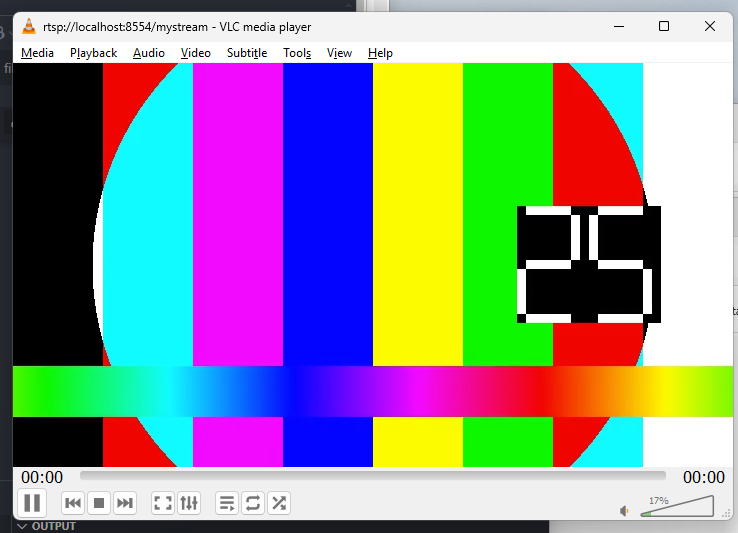
Now, you can run VLC like this…

…and you will receive a test steam (audio and video) that looks like this…
 .
.
A common read about testsrc is this the bogotobogo blog(or whatever that is :)) here